| | | | Inside TypeMetal, Issue 2Welcome to our second installment! Thank you to TypeMetal user Pramod Janamanchi for suggesting this issue’s main article topic: Writing TypeMetal’s User Guide (Help), Using TypeMetal! There’s also a quick overview of plans for TypeMetal 2 updates and TypeMetal 3 TestFlight rollout, below. You can read this issue online if you prefer. You’re also welcome to leave and rejoin the Inside TypeMetal email list anytime! Thanks for reading, and enjoy! Troy Stephens
Founder and TypeMetal Developer
Coherence Labs, LLC | | | |
|
|
|
| | What’s your go-to format for most of the note-taking and writing you do? | | | |
| | Thanks! Your answers help guide TypeMetal’s development! | | | |
|
|
|
| | | | The Road Ahead, for TypeMetal 2 and 3Issue 1 dropped some big news about TypeMetal 3 — a major new version I started work on last summer. It’s natural for that to raise questions about how updates are going to work, for enhancements going into TypeMetal 2 and beyond, and for testing and release of TypeMetal 3. Here’s the plan: - TypeMetal 3 will be a free update for everyone who’s purchased TypeMetal. The goal is to get its major improvements into everyone’s hands — plus I want to thank all those who took a chance on a new and relatively unknown product and helped support TypeMetal’s development to date.
- With some work left to be done on TypeMetal 3 before it’s ready for release later this summer, I want to make sure to continue getting needed enhancements and fixes out to all of you, so there be additional TypeMetal 2 updates coming.
- I’ll have important decisions to make about which enhancements can go in to TypeMetal 2 updates, and which are best folded into TypeMetal 3. Wherever feasible, fixes for high-priority issues that don’t have a broad, foundational impact can make it into TypeMetal 2 updates. Some issues are more effectively addressed atop the major architectural improvements built into TypeMetal 3, so will make more sense to incorporate into that major new release. Either way, they will be delivered into the hands of all current TypeMetal users; it’s just a question of the most efficient way to get them implemented and deployed.
The next TypeMetal 2 update — TypeMetal 2.3 — is now in early TestFlight deployment. I’m still finalizing the full set of enhancements destined for it. If you’re encountering any rough spots using TypeMetal that would be helpful to have fixes or improvements for, please don’t hesitate to tell me about them at support@coherencelabs.com! I want to make every effort to address them and improve your TypeMetal experience as quickly as possible. And if you’d like to help try out TestFlight builds, just email to ask to be added to the TestFlight list! As for TypeMetal 3, I’m super excited about the progress I’ve been able to make. I’d of course always like for that progress to go even faster when possible 😁, but I know the solid foundation I’m building into it is going to make a world of difference to TypeMetal’s long-term future. TypeMetal 3 isn’t quite ready for widespread beta testing yet, but that’s the goal I’m working toward. Depending on other work, a first TestFlight build could be ready sometime in July, and when the time comes I’ll be sure to put out a call here in Inside TypeMetal for any users who’d like the chance to try the new features out ahead of release! I’ll greatly appreciate the help of intrepid early adopters in helping shape TypeMetal 3. ❤️ | | | |
|
|
|
| | | | Writing TypeMetal’s User Guide (Help), Using TypeMetalOne nice perk of developing TypeMetal was getting to use it to write its own Help content. Hypertext of any kind, with its ability to link across topics, is a natural format for writing app user guides, and macOS’ Help system is built on simple collections of standard HTML files, so TypeMetal is a natural tool for authoring macOS app Help. HTML app Help is also easy to publish online. In TypeMetal’s case, all I need is to adapt each Help page’s content to match coherencelabs.com’s WordPress theme and navigation provisions. I’ve automated that repetitive task using a simple Ruby script that helps me keep TypeMetal’s online “User Guide” continually up-to-date with each new TypeMetal release. There are three key parts of the Help book creation process to tell you about: - Writing the Help pages.
- Building the Help pages into TypeMetal as a “.help” bundle.
- Deploying the Help pages on coherencelabs.com as TypeMetal’s User Guide.
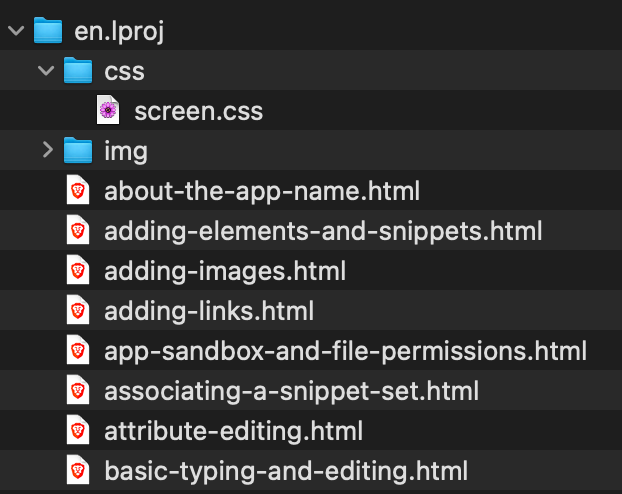
Writing the Help PagesEach Help page is just a simple, standard .html file that explains some particular topic. I keep these .html files all together inside a single Help folder in TypeMetal’s source tree, wrapped in an en.lproj subfolder that indicates English language localization. This sets up the basic internal structure expected for a macOS .help bundle, as we’ll see below in “Building the .help Bundle.” Alongside the .html files are a couple of subfolders, that hold the images they incorporate (in img) and the CSS stylesheet that I created to style TypeMetal’s Help (in css): | | | |
| |  | | | |
| | The structure of each .html file is fairly simple: a “page” container that wraps a header, footer, and a “content” section where the page’s unique text and other content goes: | | | |
| | <body>
<section id="page">
<header>
...
</header>
<section class="content">
...
</section>
<footer>
...
</footer> | | | |
| | Structural Outline of a TypeMetal Help Page | | | |
| | The <header> displays the Help book title —“TypeMetal” — as an <h1> heading, and includes links for navigating to the next and previous Help pages. The <footer> contains a copyright message with some links. Inside the <section> with class="content" is where I write the Help topic title as an <h2> heading, followed by the topic’s content. Within that content, all links to other pages, and references to images in the img folder, are written as relative URLs. (TypeMetal sees to that automatically, when helping me create the links.) Each .html file references the TypeMetal Snippet Set I created to help me maintain common conventions throughout TypeMetal’s Help content: mostly simple things like enclosing usage tips in <section class="tip">, marking up menu item titles as <strong class="menuitem">, and wrapping the word “TypeMetal” in <strong class="appname">. I can easily apply any of these custom snippets while writing, using TypeMetal’s keyboard-driven completion UI, and TypeMetal’s Help maintains a nice, uniform look as a result of the styling consistency that supports. Sometimes it’s useful to be able to link to a particular part of a page — especially from Help buttons in TypeMetal’s UI. A destination that macOS’ Help system can be asked to jump to is called a “Help anchor”, and for compatibility with the tool that indexes your Help content for search and jump capabilities, it’s necessary to create those Help anchors using the older HTML <a name="anchor-name"> convention instead of by assigning anchor names as “id” attributes. (TypeMetal’s automatic page validation rightly warns about this obsolete HTML pattern. I just have to disregard those validator warnings for now.) Note that you need to have a defined anchor even when you just want to open a given Help page as a whole. You can simply define the anchor at the start of the page’s content. Since I want TypeMetal to be able to open the General Settings Help page when the user clicks the “(?)” button in the General Settings panel, for example, I’ve defined a “general-settings” anchor at the top of that Help page’s content. To make it a bit more convenient to open named help anchors in TypeMetal’s Help Book, I’ve defined a simple category method on NSHelpManager that I use throughout TypeMetal’s code: (“TechPad” was my initial working title for TypeMetal.) | | | |
| | @interface NSHelpManager (TechPadExtensions)
// Jumps to the named help anchor in TechPad's help.
+ (void)techPad_openHelpAnchor:(NSString *)anchor;
@end | | | |
| | All this method does is look up the Help Book name and then ask NSHelpManager to open the requested anchor: | | | |
| | @implementation NSHelpManager (TechPadExtensions) + (void)techPad_openHelpAnchor:(NSString *)anchor { NSString *locBookName = [[NSBundle mainBundle] objectForInfoDictionaryKey:@"CFBundleHelpBookName"]; // See the documentation for NSHelpManager openHelpAnchor:inBook: [[NSHelpManager sharedHelpManager] openHelpAnchor:anchor inBook:locBookName]; } @end | | | |
| | Everything else about a Help file’s content is open-ended. You’re free to build that content from whatever kinds of HTML elements you find useful and appropriate, and can use TypeMetal’s full set of HTML editing capabilities to make that easy. | | | |
| | Building the “.help” BundleEmbedding a .help bundle into an .app involves two key steps: - Copying the .help file subtree into the .app bundle’s Resources directory.
- Indexing the .help bundle’s .html files.
You use the hiutil command-line tool to perform Help book indexing. This is a crucial step, without which macOS’ Help system won’t be able to display your Help book. A .help bundle also needs an Info.plist file that describes it to macOS’ Help system. The Info.plist file for TypeMetal’s .help bundle is pretty straightforward boilerplate, that gives the Help book a title and tells the Help system to treat index.html as its main starting page: | | | |
| | <?xml version="1.0" encoding="UTF-8"?> <!DOCTYPE plist PUBLIC "-//Apple//DTD PLIST 1.0//EN" "http://www.apple.com/DTDs/PropertyList-1.0.dtd"> <plist version="1.0"> <dict> <key>CFBundleDevelopmentRegion</key> <string>en_US</string> <key>CFBundleIdentifier</key> <string>com.CoherenceLabs.TypeMetal.help</string> <key>CFBundleInfoDictionaryVersion</key> <string>6.0</string> <key>CFBundleName</key> <string>TypeMetal</string> <key>CFBundlePackageType</key> <string>BNDL</string> <key>CFBundleShortVersionString</key> <string>1.0</string> <key>CFBundleSignature</key> <string>hbwr</string> <key>CFBundleVersion</key> <string>1.0</string> <key>HPDBookAccessPath</key> <string>index.html</string> <key>HPDBookIndexPath</key> <string>search.helpindex</string> <key>HPDBookTitle</key> <string>TypeMetal Help</string> <key>HPDBookType</key> <string>3</string> </dict> </plist> | | | |
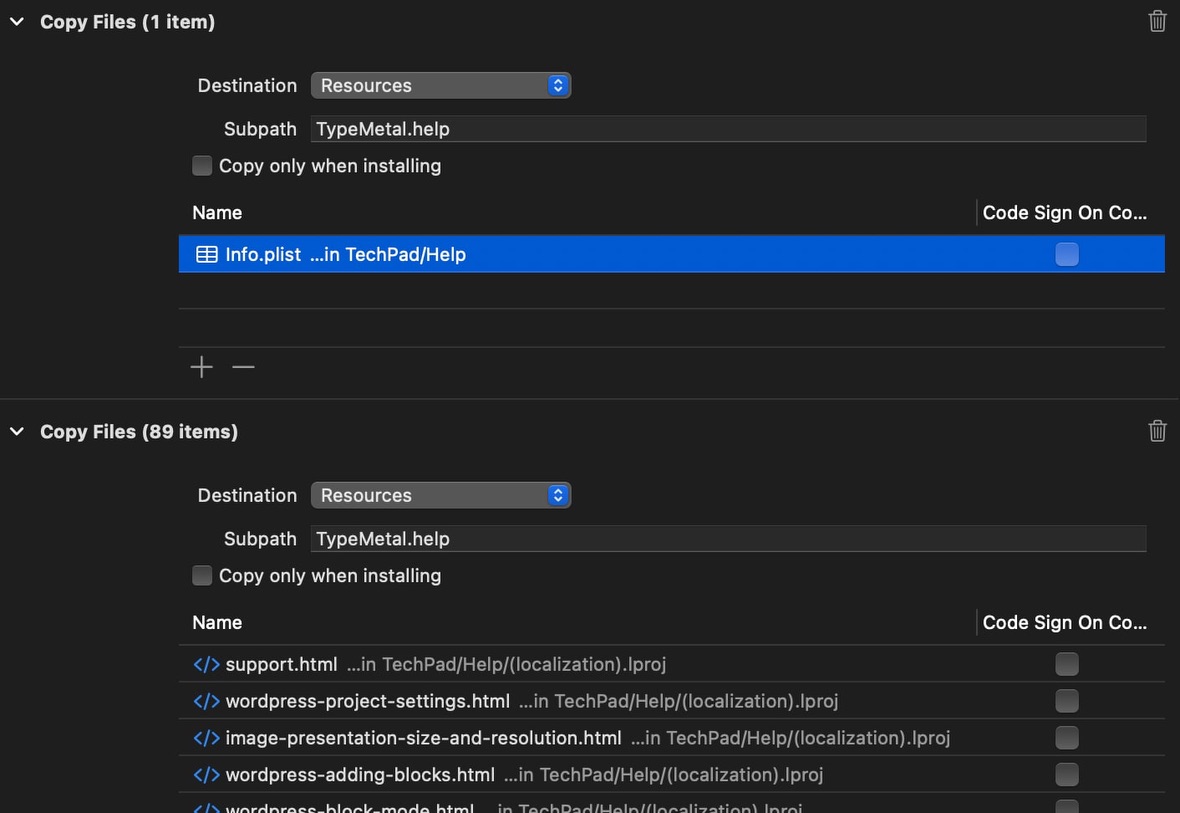
| | I use a series of Build Phases in TypeMetal’s Xcode project to make embedding and indexing of the .help bundle an automatic part of building TypeMetal. The file copying is easily accomplished using a series of standard “Copy Files” build phases — one for the Info.plist, and one for the remaining files: | | | |
| | This injects a copy of the nearly complete TypeMetal.help bundle into TypeMetal.app’s Resources subdirectory. The final step is to index the .help bundle, which I’ve found it easiest to do in its build destination. To index the .help bundle in-place, I use a “Run Script” build phase in TypeMetal’s Xcode project: | | | |
| | 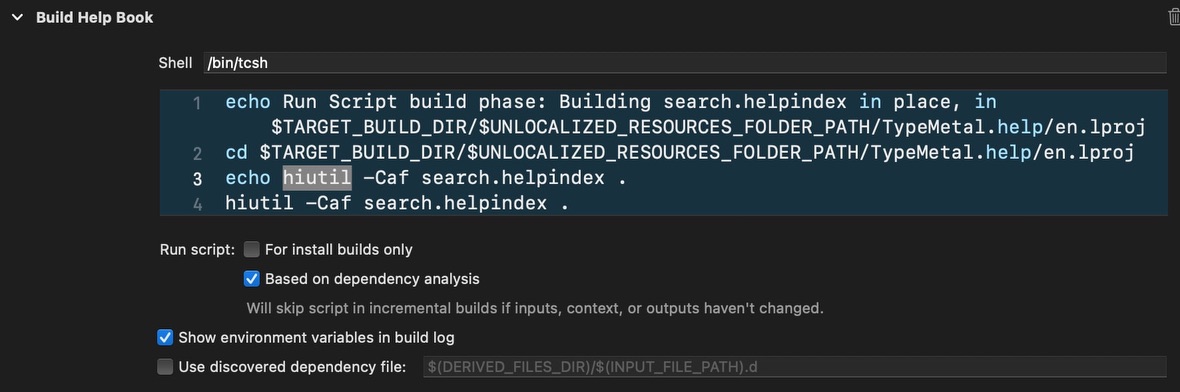 | | | |
| | The key action is to run the hiutil -Caf search.helpindex . command with the en.lproj directory as the current working directory. This produces a search.helpindex file in the en.lproj directory, that macOS’ Help system will use to present the content as a searchable Help book. One caveat is that the hiutil indexing tool has historically required the Help book’s root file — index.html, in my case — to be in XHTML format rather than HTML 5. So while the rest of my .html files are in HTML 5 format, I created and maintained my index.html as an XHTML 1.1 file. I haven’t checked whether this is still strictly necessary with the latest version of hiutil, but having one file be XHTML is a minor detail that doesn’t cause me any content production trouble. Another thing to be aware of is that the Help system can have trouble opening an app’s Help book pages in a development build running under Xcode, for reasons I haven’t yet diagnosed that I suspect might be due to having multiple .app bundles with the same bundle identifier hanging around. Don’t panic if your app fails to open a requested Help page in a development build, despite your having provided everything required per the overview above. I’ve found it’s more instructive to test opening of Help in an App Store-signed release build, such as a TestFlight build. If opening your app’s Help and help anchors doesn’t work there, you’ll want to check that embedding and indexing of the Help bundle succeeded. The simple build setup I’ve described above could be more optimal. There’s no dependency analysis in it currently, so the copying and indexing happens each time TypeMetal is built. This hasn’t yet been enough of a drag on my build cycle to divert my attention to fixing it, but could be worth improving when priorities allow. | | | |
| | Publishing the Help Online
When I ship a new version of TypeMetal, I want to expediently update the “User Guide” on coherencelabs.com to contain the latest Help content. I use a Ruby script to automate processing of the original Help .html files into revised form for the User Guide. The Ruby script uses the “nokogiri” HTML parsing and manipulation package to perform the desired modifications. Running it updates the corresponding .html files in a git-tracked “CoherenceLabsWeb” project that contains the files I deploy on coherencelabs.com. After running build-typemetal-help-for-web, I inspect the changes vs. the last published version (Tower + Kaleidoscope are favorite tools that team up to make that easy), then commit the changes to git and upload the new files to coherencelabs.com via FTP using Transmit. Here’s a snapshot of the script, and the .html template file it uses. | | | |
|
|
|
| | | | That’s all for this issue!Hope you found this stroll through TypeMetal’s help-authoring process interesting and useful! Have a question or a topic you’d like to hear about in a future issue of Inside TypeMetal? Let me know by replying to this email! Thank you again for your greatly appreciated support, and see you in the next issue! All the Best,
Troy | | | |
|
|
|
|